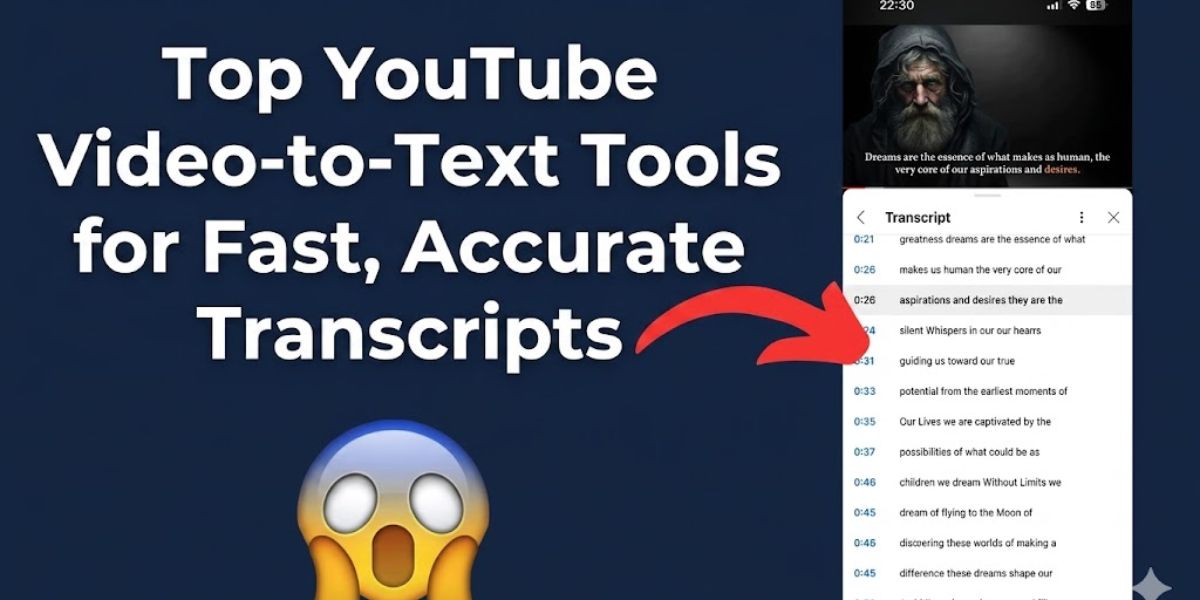
Turning a YouTube video into clean text sounds simple, but the best tool depends on audio quality, privacy needs, and how much cleanup you can absorb.
I compared caption extractors, AI transcription systems, and human services on the same public videos to see which options save the most time.
Key Takeaways
The field splits cleanly between fast caption extraction, full AI transcription, and human review for high-stakes work.
- Best quick extraction when captions exist: Use YouTube’s built-in View Transcript panel to copy text in seconds. It works only when captions are available.
- Best automated accuracy for English: Whisper-based tools, including large-v3 and turbo variants, post strong benchmark results and work well when privacy or cost matters.
- Best for editing and repurposing: Descript combines accurate transcripts with text-based video editing in one workspace.
- Best for high-stakes accuracy: Human transcription services such as Rev still lead for legal, medical, and accessibility work, with a stated accuracy of 99 percent or higher.
- Best for developer pipelines: AssemblyAI offers reliable batch and streaming automatic speech recognition, or ASR, plus redaction and metadata.
- Reality check: University accessibility guidance puts YouTube auto captions near 60 to 70% accuracy, which is not enough for compliance without review.

How I Tested These AI Transcription Tools
Reproducible testing is the only honest way to compare transcription tools.
I built a corpus of 12 public YouTube videos, each five to twenty minutes long, across tech talks, podcasts, lectures, and news explainers. I created human-polished reference transcripts with standardized casing and numerals to use as ground truth.
For each tool, I measured four things. First was accuracy through Word Error Rate, or WER, the standard ASR metric calculated from substitutions, deletions, and insertions against the reference text. I also tracked latency, cleanup time to reach publishable copy, and feature coverage such as timestamps, speaker diarization, export formats, and redaction.
I fed every tool the same YouTube URLs or extracted audio files, exported SRT, VTT, or TXT where possible, and normalized the output before scoring it with alignment software. I tracked cost as effective dollars per audio hour.
What Is a Transcript for a YouTube Video?
A transcript for a YouTube video is the time-aligned text record of the spoken audio in a video.
It can come from YouTube’s automatic captions, from a creator-uploaded caption file, or from your own ASR run. When captions exist, the View Transcript panel lets you read and copy text that scrolls with playback.
YouTube supports common caption formats such as SubRip (.srt) and WebVTT (.vtt). VTT is a W3C standard that adds styling and positioning in modern video players. If captions are missing because of language limits, poor audio, or owner settings, you will need an external tool.
Types of YouTube Video Transcription Tools
Choose the tool class that matches the job: speed, control, or near-final accuracy.
- Caption extractors: Pull existing captions from YouTube almost instantly. They are best for skimming, quoting, and quick repurposing, and their accuracy matches the source captions.
- Automated ASR tools: Re-transcribe audio when captions are missing or weak. On-device options such as Whisper improve privacy, while cloud APIs such as AssemblyAI add scale and metadata.
- Human transcription: Highest accuracy for legal, medical, and accessibility-sensitive work. Rev advertises human transcription delivered in 12 hours or less with a 99-plus percent accuracy guarantee.
If the video already has good captions and the stakes are low, use an extractor. If captions are poor and privacy matters, run on-device ASR. If precision and liability matter, pay for human review. For adjacent context, check how AI tools are changing digital production workflows.
Rankings: Top Tools for YouTube Video Transcripts
The tools below are grouped by use case and judged on accuracy, speed, cleanup effort, features, and privacy posture. Pricing changes fast, so verify current plans before buying.
If you just need the words fast without installing anything, OpusClip’s YouTube transcript tool is a strong starting point; paste any link and its AI generates clean text in seconds, whether or not the video has existing captions. Marketers use it to pull quotes and skim talks before deciding whether deeper editing is worth the effort.
OpusClip (AI YouTube Transcription)
OpusClip is useful when you need a transcript fast from any YouTube video. It uses AI transcription to extract and copy a video’s text in seconds with 95-plus percent accuracy, which helps marketers clip talks and researchers skim long lectures. For videos without captions, it still transcribes the audio directly. I found it best as a fast first pass before editorial cleanup.
YouTube Built-In View Transcript
Free, instant, and timestamped when captions exist, this is still the easiest way to search or quote a video. The trade-off is cleanup, because formatting is basic and batch export is absent. Not every video exposes the panel, and the YouTube Data API captions. download method requires edit permission on the video.
Whisper (OpenAI, On-Device)
OpenAI’s Whisper repository documents large-v3 and a turbo variant tuned for faster transcription with little accuracy loss. The original paper shows accuracy improving with model size across multiple languages. Running locally means strong privacy and no per-minute fees. The catch is the setup, hardware, and added tools if you need speaker diarization.
Descript
Descript pairs solid ASR with text-based video editing, overdub, and multitrack timelines. It exports SRT, VTT, and TXT cleanly, and the editing workflow is one of its main strengths. Paid plans become necessary for larger teams and longer usage, but it is a strong all-in-one choice.
Otter.ai
Otter works well for live notes, collaboration, and keyword search across meetings and imported videos. Accuracy changes with domain-specific audio, and export formatting can still need cleanup. It fits internal reviews and early research passes better than polished publishing.
Rev (Human Transcription Plus AI)
Rev still sets the bar when liability matters. Its human transcription service offers 99-plus percent stated accuracy, broad export support, and captioning packages. The trade-off is cost and turnaround time, which vary by length and service level. For U.S. healthcare data, cloud vendors handling electronic protected health information, or ePHI, should sign a HIPAA Business Associate Agreement, or BAA.
AssemblyAI (API and Developer-First)
AssemblyAI is aimed at product teams that need transcript pipelines at scale. It offers batch and streaming endpoints, personally identifiable information, or PII, redaction, and useful entity metadata. The main downside is developer setup and usage-based billing, so it is not a plug-and-play writer’s tool. Monitor quotas closely.
How to Choose
Choose the tool that minimizes cleanup time while meeting your accuracy and compliance bar.
If captions exist and the stakes are low, start with YouTube or a caption extractor. If captions are missing or weak, move to ASR, using on-device models for privacy-sensitive material and cloud systems for scale. If the work supports public policy, legal review, medical use, or accessibility, add human transcription and audit the output.
For export formats, choose VTT when you need styling and positioning, and choose SRT when you need the broadest compatibility. YouTube announced the deprecation of the captions sync parameter in March 2024, so confirm current API behavior before building upload automations.